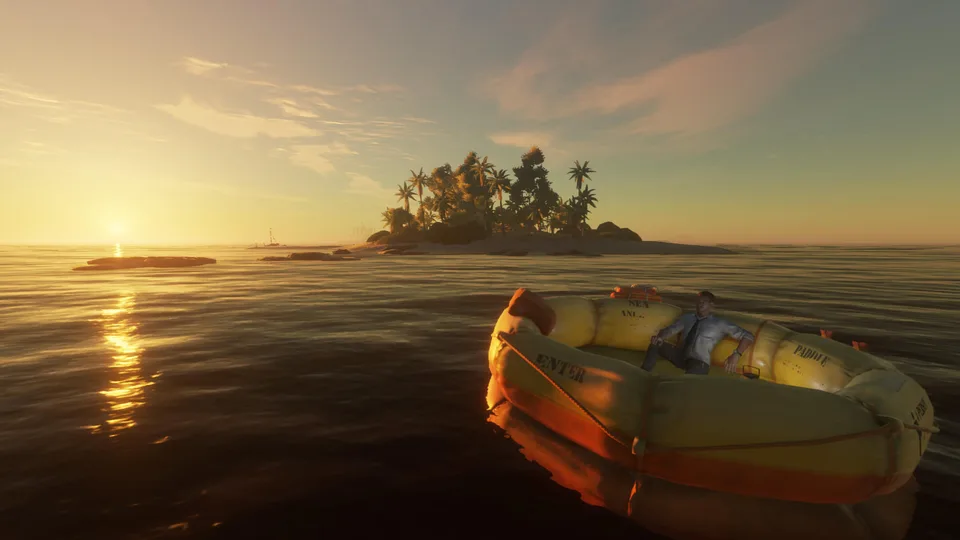
Learn how to fix your stranded deep life raft stuck on land with proven community methods. Get expert survival tips and get back to sea today.
Published: Stranded Deep Wiki Editorial Team
Table of Contents
Understanding the Stranded Deep Life Raft Stuck Issue
Surviving on a remote Pacific island in Stranded Deep presents countless daily challenges, but few are as frustrating as waking up to find your primary mode of transportation stranded. When your stranded deep life raft stuck scenario occurs, it completely halts your exploration and resource gathering. Knowing how to quickly resolve this physics glitch or environmental trap is essential for your survival loop.
According to a community report from Steam player discussions, this common grounding issue often happens due to shifting tides, ocean currents, or careless parking. If you leave your inflatable watercraft unsecured right on the waterline, waves and currents can easily push it high and dry onto the sand. Fortunately, the fix is straightforward once you know the correct interaction mechanics implemented by Beam Team Games.
Proactive Raft Management
Always secure your watercraft by dragging it further up the beach using the right-click drag mechanic, or deploy a sea anchor when stopping near wrecks to prevent accidental drifting.
Step-by-Step Guide to Free Your Grounded Boat
When facing a stranded deep life raft stuck situation, panic will only drain your vital stats faster. You need to execute a precise physical retrieval process to push your vessel back into navigable waters without damaging your gear or attracting unwanted attention from predators.
Walk carefully into the shallows near your grounded watercraft while keeping a close eye on the surrounding water for lurking sharks.
Approach the vessel and press your interactive control buttons—specifically holding the right-click action on PC to grab the hull.
Step backward slowly while holding the grab command to drag the boat off the shoreline and back into floating depth.
Jump aboard immediately, grab your paddle, and deploy your sea anchor or paddle away to a safe distance.
The following comparison table outlines the common causes behind vessel displacement and their respective prevention strategies.
Cause of Displacement
Environmental Factor
Prevention Strategy
Tidal Drift
Natural ocean currents
Pull the craft high onto dry sand or use anchors
Shallow Grounding
Poor parking angle
Position the front/rear correctly before dismounting
Storm Shifting
Heavy weather events
Store components securely inside base camps
Essential Raft Mechanics and Survival Tips
Mastering your vessel goes beyond simply fixing a stranded deep life raft stuck glitch. Player experience shows that many beginners lose their primary transport simply because they do not understand the directional orientation and hidden storage compartments built into the craft.
Your watercraft features a distinct front and rear orientation. The front is designated near the ration supplies, while the back houses the sea anchor and paddle point. Recognizing this layout helps immensely when maneuvering through tight coral reefs and narrow shipwrecks. Furthermore, your starting vessel contains vital survival gear that many new players completely overlook during their first frantic days on the island.
Hidden Compartment
Open the built-in raft storage immediately when starting a new game to retrieve your essential compass, medical bandages, and food rations.
Sea Anchor Utility
Deploy the sea anchor whenever you stop near a shipwreck in deep water to keep your boat from drifting away while you dive.
Paddle Preservation
Your paddle is your literal lifeline; never leave it floating loose in the ocean current, or you will find yourself stranded permanently.
To help you manage your early-game survival assets effectively, review the equipment breakdown table below.
Equipment Item
Primary Function
Risk if Lost
Paddle
Propulsion and steering
Inability to move between islands
Compass
Navigation and orientation
Getting lost at sea permanently
Bandages
Treating bleeding and venom
Fatal health deterioration
Food Rations
Emergency sustenance
Starvation during early days
Platform Adaptability and Community Solutions
Whether you are playing on PC or console systems like Xbox and PlayStation, the core physics governing a stranded deep life raft stuck event remain largely consistent. Console players frequently encounter the same shoreline grounding issues reported by PC veterans years ago, proving that community knowledge bases are invaluable across all platforms.
According to player experience shared on official forums, utilizing the standard grab-and-drag mechanic solves over ninety percent of grounding incidents. If your vessel somehow clips severely into terrain geometry beyond standard dragging limits, saving and reloading your game session often resets physics calculations and frees the stuck model.
Predator Awareness
Always scan the water for sharks before jumping into the shallows to retrieve a grounded boat, as an unexpected attack can end your survival run instantly.
For further technical support and community discussions regarding physics anomalies, you can visit the official Stranded Deep Steam Store Page to read up-to-date player guides and developer patch notes.
Frequently Asked Questions
Why is my Stranded Deep life raft stuck on the beach?
Your vessel likely drifted due to real ocean currents or wave action pushing it onto shallow sand. You can resolve this stranded deep life raft stuck issue by walking into the water, right-clicking and holding the boat, and dragging it backward off the shore.
Can I lose my paddle permanently in Stranded Deep?
Yes, if you leave your paddle floating in open ocean currents without securing it, it can drift away. While you can occasionally find replacement paddles near shipwrecks, losing your initial paddle makes navigation extremely difficult.
How do I prevent my boat from floating away while I explore wrecks?
You should deploy the built-in sea anchor when you reach deep-sea wreckage sites. This holds your watercraft in a stable position so you can dive safely without worrying about surface currents carrying your transport away.
Do console versions have the same raft mechanics as PC?
Yes, console players experience similar physics interactions. The core method to fix a stranded deep life raft stuck scenario—grabbing and dragging the hull backward into the water—works identically across PC, Xbox, and PlayStation versions.